
Swifly
Swifly is an AI dictation and voice typing app for Mac, Windows and iPhone. Turn speech into text for emails, documents and AI prompts. Free Basic plan available; dictation requires internet access.
DR:DR 3.5(Domain Rating by Ahrefs)
Added on:Nov 05, 2026
Pricing:Freemium
What is Swifly?
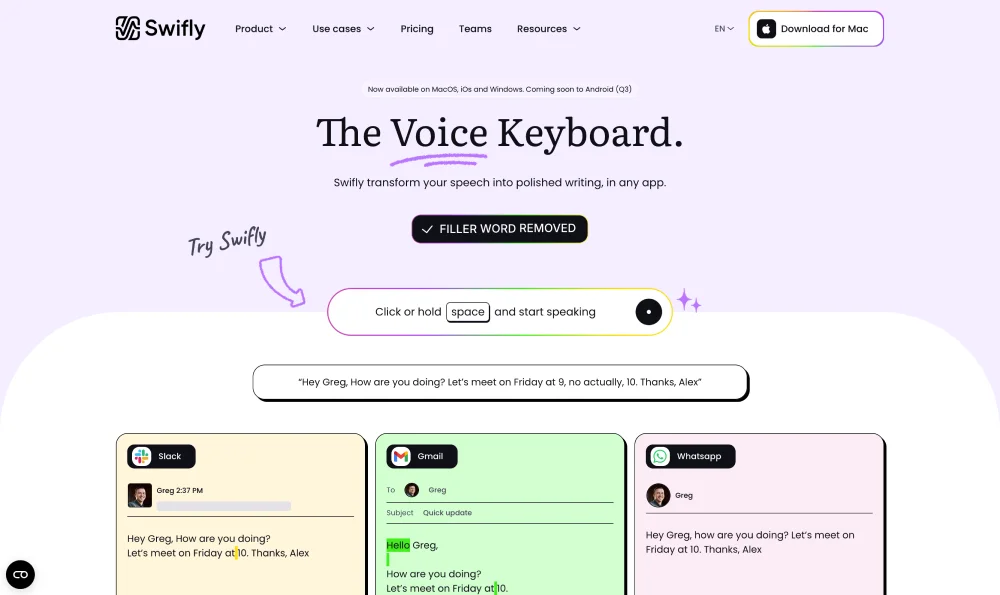
Swifly is an AI voice typing and dictation app that turns spoken thoughts into clear, polished writing without interrupting a user's workflow. Rather than typing every sentence, users speak naturally and Swifly inserts the resulting text directly into the apps they already use, including email clients, messaging tools, documents, browsers, and productivity software. It can help with everyday messages, reports, notes, meeting follow-ups, and prompts for AI tools. Beyond basic speech to text, Swifly improves the quality and presentation of dictated content. It removes filler words, smooths phrasing, adds natural punctuation, and can adapt wording to the context of the destination app. A message can sound more formal in an email, more conversational in a team chat, or more relaxed in a personal message. Users can also select existing text for one-click polishing, rewriting, or translation without switching applications. Swifly supports more than 100 languages and can recognize the language being spoken. Users may dictate in one language and have the text delivered in another, making it useful for multilingual communication. A personal dictionary helps Swifly recognize names, company terms, abbreviations, and specialist vocabulary. Swifly's reusable snippet library lets people insert standard replies and templates with short voice commands. Available for Mac, Windows, and iPhone, Swifly offers plans for individuals and teams. The free Basic plan includes a monthly word allowance, while Pro adds unlimited dictation, command-based editing, prioritized support, early access to features, and team collaboration. Business and enterprise options can include shared dictionaries and snippets, centralized billing, usage dashboards, and additional security controls. Swifly uses cloud processing for dictation, so an internet connection is required. Its Privacy Mode is designed to prevent transcript storage and use of transcripts for model training. Overall, Swifly helps frequent writers, professionals, and teams communicate faster, capture ideas as they happen, and create polished text by voice.
Key features of Swifly
- Context-aware speech-to-text across everyday apps
- Natural rewriting, polishing, and text formatting
- Multilingual dictation across 100+ languages
- One-click translation between selected languages
- Personal dictionaries for names and terminology
- Reusable voice shortcuts for frequent replies
- Shared team snippets and collaboration controls